• About
    • Who We Are
    • Partners & Providers
    • News & Events
    • The ESRD Blog
    • Careers
    • Contact Us
  • Applications
    • What We Solve
    • Detailed Stress
    • Composites
    • Fracture Mechanics
    • Residual Stress
    • Sim Apps
  • Products
    • What We Develop
    • StressCheck Professional
      • StressCheck Core
      • Solvers
      • Advanced Modules
      • Utilities
      • Academic Licensing
    • StressCheck Apps
      • CAE Handbook
      • StressCheck Tool Box
    • Product Updates
  • Support
    • How We Can Help
    • Training
    • Webinars
    • Quick Start Guide
    • Help Documentation
    • Software FAQ’s
  • Simulation
    • How We Simulate
    • Benchmarks
    • Simulation Governance
    • History of FEA
    • Dictionary & Terms
  • Resources
    • Browse Our Resource Library
    • White Papers
    • Case Studies
    • Product Demos
    • StressCheck Tutorials
Serving the Numerical Simulation community since 1989
  • Contact Us
  • Register
Login
Forgot Password?
Join Us
ESRDESRD
ESRDESRD
  • About
    • Who We Are
    • Partners & Providers
    • News & Events
    • The ESRD Blog
    • Careers
    • Contact Us
  • Applications
    • What We Solve
    • Detailed Stress
    • Composites
    • Fracture Mechanics
    • Residual Stress
    • Sim Apps
  • Products
    • What We Develop
    • StressCheck Professional
      • StressCheck Core
      • Solvers
      • Advanced Modules
      • Utilities
      • Academic Licensing
    • StressCheck Apps
      • CAE Handbook
      • StressCheck Tool Box
    • Product Updates
  • Support
    • How We Can Help
    • Training
    • Webinars
    • Quick Start Guide
    • Help Documentation
    • Software FAQ’s
  • Simulation
    • How We Simulate
    • Benchmarks
    • Simulation Governance
    • History of FEA
    • Dictionary & Terms
  • Resources
    • Browse Our Resource Library
    • White Papers
    • Case Studies
    • Product Demos
    • StressCheck Tutorials

StressCheck Core

Home ProductsStressCheck ProfessionalStressCheck Core

StressCheck Core

StressCheck Core is the primary building block of StressCheck Professional.  It includes the 64-bit graphic user interface (GUI) and features a complete pre- and post-processor built around a parametric handbook framework that supports standardization of design and analysis processes.

With StressCheck Core, any attribute of the model (geometry, material properties, loads, constraints) can be defined parametrically, and in many cases formulae may be used as input or output.

StressCheck Core also includes support for Parasolid CAD importation, an integrated MeshSim automesher for curved 2D and 3D automatic meshing, and a COM API for development of custom applications or communication with other analysis tools (e.g. Excel, MATLAB, MathCAD, AFGROW, etc.).

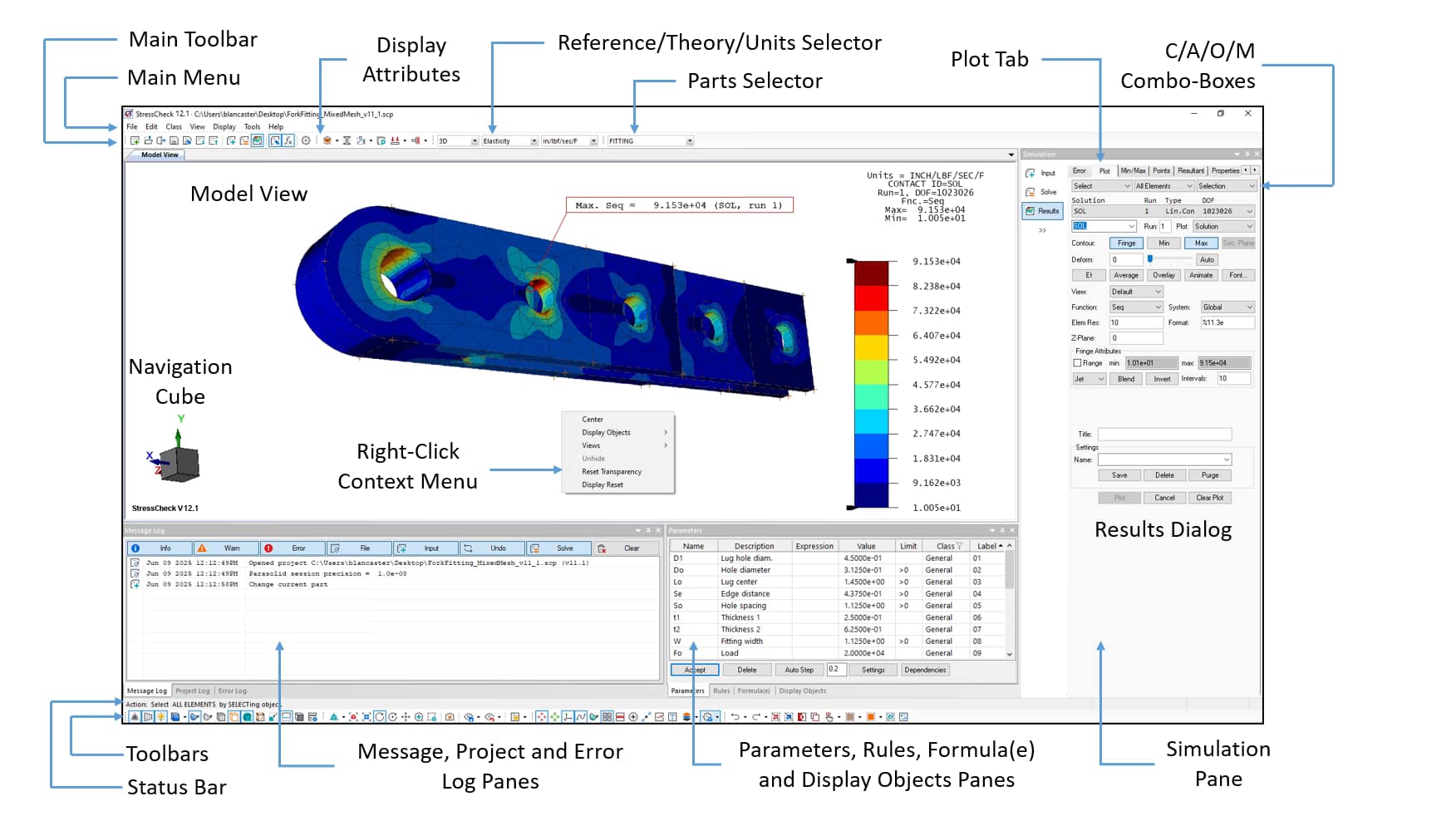
 StressCheck’s default interface layout. A contour plot was produced in the Model View via the Results dialog.

Key Features and Benefits

The following are key features and benefits StressCheck Core users will enjoy:

  • Elements easily map to curved geometry to promote the most accurate analysis.
  • If nodes “know” about underlying geometry, elements will conform.
  • Solid elements can have aspect ratios (length divided by thickness) of 200:1 and more.
  • Critical for modeling of thin domains and laminated composites.
  • Extremely flexible pre-processing, with options to specify inputs via parameters or formulae to best describe the problem at hand.
  • The solution is represented continuously through the domain, not restricted only to nodes.
  • p-FEM formulation provides users with practically limitless output options.
  • High order elements require fewer degrees of freedom than linear elements to obtain an extremely high-quality solution.
High-Order Element Technology
  • Automatic convergence studies provide error estimation without remeshing.
  • All results are computed “on the fly” – no need to specify the quantities of interest before solving.
  • View convergence of any quantity at any location without averaging or interpolation.
  • Unique point extractions for gradients of stress or strain anywhere in the mesh.
  • For example, extracting the radial stress at 360 locations around around a hole.
  • Extractions not limited to nodes, edges or faces.
Advanced Post-Processing
StressCheck Core integrates the MeshSim automesher from Simmetrix, allowing users to jump right into meshing their complex geometries with curved elements. The automesher supports 2D and 3D meshing of sheet and solid bodies, imported or generated by StressCheck Core’s geometry modeling engine.

  • Supports triangular and quadrilateral element generation.
  • Provides advanced controls for 3D automeshing.
  • Generates midside node elements for improved representation of geometry.
  • Creates efficient mesh grading through local refinements.
Curved Element Automesher
StressCheck Core contains powerful Parasolid kernel functionality for fully-parametric CAD modeling, either from “scratch” or by modification of imported geometry. This includes operations such as blends, Booleans, chamfers, embedding of surfaces, imprints and more.

  • Create and edit 3D parts using a variety of Parasolid solid modeling functions.
  • Describe any geometric operation using a parametric or formulaic expression.
  • Modify imported geometry with new features to allow for maximum flexibility in analysis.
  • Export geometry in Parasolid format for use in other tool.
Parametric CAD Modeler
Included in StressCheck Core is the functionality to set up multi-body contact analyses quickly and easily. Simply declare the contact regions for each part to be analyzed, connect the regions via contact constraints, and solve elastic or elastic-plastic materials. No gimmicks, no special elements required. There can be one contact pair or many, as there is no limit to the number of parts in the analysis.

  • The meshes on the mating surfaces do not need to match.
  • The formulation, based on the augmented Lagrangian algorithm, delivers high efficiency MBC solutions for close-contact problems.
  • Elastic-plastic solutions are supported using a dual-iteration procedure.
  • Neat fit, interference fit and clearance conditions can be specified.
Multi-Body Contact (MBC) Analysis
Support for breakout, or Global-Local, analysis in StressCheck Core is a life-saver for companies needing to transfer structural loads to detailed models quickly and accurately, and obtain reliable solutions for detailed stress, fracture or composites analyses. Import point forces/moments a variety of ways, and use Global-Local features to apply to detailed parts.

  • Total Load at a Point (TLAP) functionality for transferring nodal forces/moments to detailed model cut sections.
  • Translate shell running loads or displacements to StressCheck solid or shell elements.
  • Statically equivalent traction distributions computed from point forces/moments.
  • Utilities available for translation/importation of point forces/moments to StressCheck formats.
Global-Local/Breakout Modeling
The Design Study feature of StressCheck Core is the most efficient way to computationally determine the influence of independent design variables on the data of interest. Independent variables can include geometric sizings, material properties, loads, constraints and more.

  • Vary one or more independent design parameters simultaneously.
  • Access all solution information from a completed Design Study for any post-processing function.
  • Make instant decisions on the most influential variables.
  • Solve linear, modal or buckling problems using any number of steps and any p-level.
Design Study Analysis
Develop custom applications tailored for your organization through the StressCheck API. From simple Excel VBA scripts to .NET programs with WPF front ends, StressCheck Core’s Application Development toolkit supports solutions for the most creative engineers.

  • Automate repetitive processes with scripting.
  • Perform optimizations and “what if” studies for even the most complex analyses.
  • Design customized “Smart Apps” similar to StressCheck Tool Box’s SFAT, MFAT and LCAT.
  • Plug-in with other tools such as AFGROW and MATLAB.
Customized Simulation Applications
StressCheck Core supports shell-solid connections for improved efficiency in the analysis of laminated composites. Include thin structural features (skins, webs, etc.) without compromising the quality of the solution in the region of primary interest.

  • Connect StressCheck shells (quads/tris) to standard solids (pentas/hexas).
  • Decrease degrees of freedom significantly by modeling thin regions with StressCheck shells.
  • Automatically enforce kinematic compatibility at the shell-solid connections.
Shell-Solid Connections
Need to model thin and thick solids at the same time? The concept behind the thin solid formulation is to reduce the degrees of freedom (DOF) where they are not needed, and to keep them where they are. Thin parts need fewer DOF through the thickness because stress distributions are expected to be simpler. With StressCheck’s hierarchic modeling, skins, webs and lamina problems become easy to handle.

  • Analyze thin structures efficiently without sacrificing quality.
  • Increase the in-plane DOFs while keeping the thru-thickness DOFs fixed during the analysis.
  • Convert a standard solid to a thin solid by point and click.
"Thin" Solid Support

Would you like to request pricing on one or more StressCheck Professional modules?

Please complete the following information and we’ll get back to you shortly on your request. Thank you!

Please indicate an organization, such as the agency, company or academic institution to which you are affiliated.

Please select one or more, then indicate the needed Solver Modules, Advanced Modules and/or Tool Box Modules below.

Are you affiliated with an academic institution and would like to use StressCheck Professional for teaching/educational purposes? Consider requesting an Academic License of StressCheck.

Solver Module descriptions
Advanced Module descriptions
Tool Box Module descriptions
Floating = server-hosted license

Node-Locked = single-device license

Loading

Looking for Resources?

Interested in a Demo, Evaluation or Purchase?

Have a Software Question, Issue or Feature Request?

Recent News & Events

  • Trustworthiness in Simulation: Credibility or Decision-grade Reliability?
  • Beyond the Black Box: Explainable AI Requires Explainable Simulation
  • Turtle Shells and Legacy Finite Element Codes: Evolutionary Constraints in the Age of Explainable AI

Quick Links

  • Quick Start Guide
  • Documentation
  • Software FAQs
  • Software Demos

Testimonials

  • “As the United States Air Force continues to extend the service life of their aircraft the Aircraft Structural Integrity Program (ASIP) has had to refine the methods it uses to analyze and predict fatigue crack growth. Through the use StressCheck, coupled with AFGROW, we in A-10 ASIP have been able to more accurately model, predict and analyze critical aircraft structure for the A-10 and other types of structure for non-A-10 system managers. This also allows us within the A-10 to more accurately assess risk for decision makers, streamline aircraft inductions into scheduled maintenance and reduce cost for total life cycle management.”

    A-10 ASIP Manager

Testimonials

“In the case of the through crack configuration, the comparison of experimental and StressCheck derived geometry factors showed a close correlation and were an improvement to solutions provided in AFGROW at the time. Based on the results of this research, StressCheck pin-loaded lug geometry factors have since been incorporated into the AFGROW software.”

Dr. Alten Grandt, Purdue University

Member Portal

  • Member Registration
  • Member Login

Contact Us

© 2026 · Engineering Software Research & Development, Inc. | Terms & Conditions | Privacy & Cookie Policy | Software License Agreement | Software Maintenance and Technical Support Policy

We use cookies on our website to give you the most relevant experience by remembering your preferences and repeat visits, as outlined in our Cookie Policy. You may adjust your cookie preferences within .

ESRD
Powered by  GDPR Cookie Compliance
Privacy Overview

This website uses cookies to improve your experience while you navigate through the website. Out of these, the cookies that are categorized as necessary are stored on your browser as they are essential for the working of basic functionalities of the website. We also use third-party cookies that help us analyze and understand how you use this website. These cookies will be stored in your browser only with your consent. You also have the option to opt-out of these cookies. But opting out of some of these cookies may affect your browsing experience.

Strictly Necessary Cookies

Strictly Necessary Cookies should be enabled at all times so that we can save your preferences for cookie settings.