• About
    • Who We Are
    • Partners & Providers
    • News & Events
    • The ESRD Blog
    • Careers
    • Contact Us
  • Applications
    • What We Solve
    • Detailed Stress
    • Composites
    • Fracture Mechanics
    • Residual Stress
    • Sim Apps
  • Products
    • What We Develop
    • StressCheck Professional
      • StressCheck Core
      • Solvers
      • Advanced Modules
      • Utilities
      • Academic Licensing
    • StressCheck Apps
      • CAE Handbook
      • StressCheck Tool Box
    • Product Updates
  • Support
    • How We Can Help
    • Training
    • Webinars
    • Quick Start Guide
    • Help Documentation
    • Software FAQ’s
  • Simulation
    • How We Simulate
    • Benchmarks
    • Simulation Governance
    • History of FEA
    • Dictionary & Terms
  • Resources
    • Browse Our Resource Library
    • White Papers
    • Case Studies
    • Product Demos
    • StressCheck Tutorials
Serving the Numerical Simulation community since 1989
  • Contact Us
  • Register
Login
Forgot Password?
Join Us
ESRDESRD
ESRDESRD
  • About
    • Who We Are
    • Partners & Providers
    • News & Events
    • The ESRD Blog
    • Careers
    • Contact Us
  • Applications
    • What We Solve
    • Detailed Stress
    • Composites
    • Fracture Mechanics
    • Residual Stress
    • Sim Apps
  • Products
    • What We Develop
    • StressCheck Professional
      • StressCheck Core
      • Solvers
      • Advanced Modules
      • Utilities
      • Academic Licensing
    • StressCheck Apps
      • CAE Handbook
      • StressCheck Tool Box
    • Product Updates
  • Support
    • How We Can Help
    • Training
    • Webinars
    • Quick Start Guide
    • Help Documentation
    • Software FAQ’s
  • Simulation
    • How We Simulate
    • Benchmarks
    • Simulation Governance
    • History of FEA
    • Dictionary & Terms
  • Resources
    • Browse Our Resource Library
    • White Papers
    • Case Studies
    • Product Demos
    • StressCheck Tutorials

What’s New and Improved in StressCheck Professional
Home SupportWebinarsWhat’s New and Improved in StressCheck Professional

February 7, 2023 @ 12:00 pm EST

What’s New and Improved in StressCheck Professional

Join us for a 2-hour webinar on the latest in StressCheck Professional, as well as what’s currently under development in our next software update. After the webinar, attendees will be encouraged to stay for an open discussion on future development activities.

REGISTER NOW
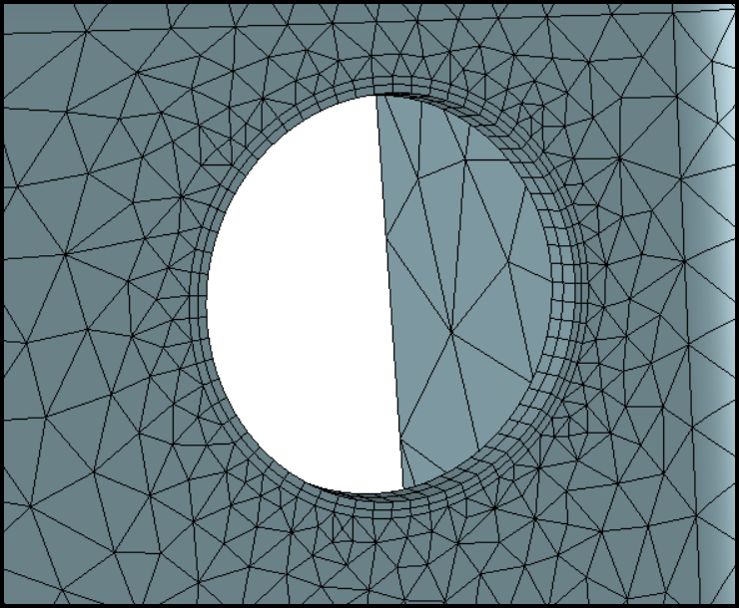
Mixed (hexa/penta/tetra) mesh boundary layer available with the release of StressCheck v11.1

WEBINAR SUMMARY

We are pleased to announce a 2-hour webinar on February 7, 2023 @ noon EST titled “What’s New and Improved in StressCheck Professional“. Demos and briefings will be provided on the following new features and enhancements, as well as features under development for our next release.

StressCheck v11.1 Release

New features and enhancements already available with the latest StressCheck release (v11.1) include but are not limited to:

  • Support for mixed (tetra/penta/hexa) meshes
  • Support for parametric scaling of global-local loads
  • Upgraded infrastructure for faster model rendering and updating
  • Improvements to load record management and load attribute rendering
  • Improved strategies for 3D crack automeshing
  • Improved strategies for 3D stress intensity factor (SIF) computation
  • Enhancements to support the automeshing of thin parts and domains
  • New CHM-based offline documentation
  • New COM API documentation

StressCheck v11.2 Development Activities

Expected features and enhancements for our next StressCheck release (v11.2, expected in Summer 2023) will include:

  • Mesh seeding to guide the Automesh by automatically using pre-existing node locations.
  • Upgraded toolbar icons for a clear and improved user experience.
  • New option to select the toolbar icons between 16×16 (default), 20×20 and 24×24 pixels size.
  • Movable Min/Max labels for Results plotting and extractions.
  • A Dependencies button on the Parameter pane which lists all dependencies on the selected parameter.
  • Column sorting and filtering for Parameters pane table including “Go To” to search for parameters.
  • Predictive text on input fields has been implemented for parameter and formula names.
  • Enhanced Index controls for filtering and sorting Geometry and Mesh object lists. including “Go To ID…” to access a specific ID.
  • Improved visualization of Selected status on dropdown lists containing assignment/set records.
  • Overhauled the Display Objects pane to support selective number ranges and additional object types.
  • Re-designed color definitions pane.
  • A list of object IDs belonging to a set “Contents:” and a list of objects that reference the set “Used By:” are now displayed when selecting a record on the Sets page.
  • Improved consistency of DeLast/Undo functionality
  • And much more under development!


We will also host a Q&A session at the end of the webinar to allow attendees to interact with and provide feedback to members of our product development team.

WEBINAR HIGHLIGHTS

Snapshot of the improved icons (20×20 pixels shown) and user experience in StressCheck v11.2
  • Overview of recent features and enhancements already implemented in StressCheck Professional
  • Demonstration of key features and enhancements available in StressCheck v11.1
  • Overview of current development activities and future plans for StressCheck Professional
  • Demonstration of key features and enhancements expected with the release of StressCheck v11.2
  • Open discussion and Q&A

REGISTER FOR THIS WEBINAR

Looking for Resources?

Interested in a Demo, Evaluation or Purchase?

Have a Software Question, Issue or Feature Request?

Recent News & Events

  • Trustworthiness in Simulation: Credibility or Decision-grade Reliability?
  • Beyond the Black Box: Explainable AI Requires Explainable Simulation
  • Turtle Shells and Legacy Finite Element Codes: Evolutionary Constraints in the Age of Explainable AI

Quick Links

  • Quick Start Guide
  • Documentation
  • Software FAQs
  • Software Demos

Testimonials

  • “As the United States Air Force continues to extend the service life of their aircraft the Aircraft Structural Integrity Program (ASIP) has had to refine the methods it uses to analyze and predict fatigue crack growth. Through the use StressCheck, coupled with AFGROW, we in A-10 ASIP have been able to more accurately model, predict and analyze critical aircraft structure for the A-10 and other types of structure for non-A-10 system managers. This also allows us within the A-10 to more accurately assess risk for decision makers, streamline aircraft inductions into scheduled maintenance and reduce cost for total life cycle management.”

    A-10 ASIP Manager

Testimonials

The capabilities available with BAMF, AFGROW and StressCheck are highly advanced and offer significant potential to achieve the high-level goal of TITANS –to reduce the need to conduct expensive and time consuming physical tests and to rely more on simulation.

Dr. Kevin Walker, Defence Science and Technology Group – Melbourne, Australia

Member Portal

  • Member Registration
  • Member Login

Contact Us

© 2026 · Engineering Software Research & Development, Inc. | Terms & Conditions | Privacy & Cookie Policy | Software License Agreement | Software Maintenance and Technical Support Policy

We use cookies on our website to give you the most relevant experience by remembering your preferences and repeat visits, as outlined in our Cookie Policy. You may adjust your cookie preferences within .

ESRD
Powered by  GDPR Cookie Compliance
Privacy Overview

This website uses cookies to improve your experience while you navigate through the website. Out of these, the cookies that are categorized as necessary are stored on your browser as they are essential for the working of basic functionalities of the website. We also use third-party cookies that help us analyze and understand how you use this website. These cookies will be stored in your browser only with your consent. You also have the option to opt-out of these cookies. But opting out of some of these cookies may affect your browsing experience.

Strictly Necessary Cookies

Strictly Necessary Cookies should be enabled at all times so that we can save your preferences for cookie settings.