• About
    • Who We Are
    • Partners & Providers
    • News & Events
    • The ESRD Blog
    • Careers
    • Contact Us
  • Applications
    • What We Solve
    • Detailed Stress
    • Composites
    • Fracture Mechanics
    • Residual Stress
    • Sim Apps
  • Products
    • What We Develop
    • StressCheck Professional
      • StressCheck Core
      • Solvers
      • Advanced Modules
      • Utilities
      • Academic Licensing
    • StressCheck Apps
      • CAE Handbook
      • StressCheck Tool Box
    • Product Updates
  • Support
    • How We Can Help
    • Training
    • Webinars
    • Quick Start Guide
    • Help Documentation
    • Software FAQ’s
  • Simulation
    • How We Simulate
    • Benchmarks
    • Simulation Governance
    • History of FEA
    • Dictionary & Terms
  • Resources
    • Browse Our Resource Library
    • White Papers
    • Case Studies
    • Product Demos
    • StressCheck Tutorials
Serving the Numerical Simulation community since 1989
  • Contact Us
  • Register
Login
Forgot Password?
Join Us
ESRDESRD
ESRDESRD
  • About
    • Who We Are
    • Partners & Providers
    • News & Events
    • The ESRD Blog
    • Careers
    • Contact Us
  • Applications
    • What We Solve
    • Detailed Stress
    • Composites
    • Fracture Mechanics
    • Residual Stress
    • Sim Apps
  • Products
    • What We Develop
    • StressCheck Professional
      • StressCheck Core
      • Solvers
      • Advanced Modules
      • Utilities
      • Academic Licensing
    • StressCheck Apps
      • CAE Handbook
      • StressCheck Tool Box
    • Product Updates
  • Support
    • How We Can Help
    • Training
    • Webinars
    • Quick Start Guide
    • Help Documentation
    • Software FAQ’s
  • Simulation
    • How We Simulate
    • Benchmarks
    • Simulation Governance
    • History of FEA
    • Dictionary & Terms
  • Resources
    • Browse Our Resource Library
    • White Papers
    • Case Studies
    • Product Demos
    • StressCheck Tutorials

System Requirements

Home SupportSystem Requirements

System Requirements

When your desktop computer is properly configured, the latest release of StressCheck will be able to solve problems with 10+ million degrees of freedom (DOF). ESRD’s system requirements and recommended configurations are below.
Optimize your StressCheck experience with the proper hardware.

Recommended System Configuration

The following system configuration is recommended for running StressCheck Professional on Windows 11 OS:

  • Intel Xeon CPU @ 2.5 GHz or greater
  • 32 GB Random Access Memory (RAM)
  • 1 TB SSD scratch disk with SAS disk controller
  • NVIDIA/AMD graphics card with 4 GB RAM or greater
  • Windows 11 Professional
  • Microsoft .NET 4.5 Framework
  • Adobe Reader (for offline documentation)

Minimum System Configuration

The following minimum system configuration is required to run StressCheck Professional on Windows 10 OS:

  • 8 GB Random Access Memory (RAM)
  • 20 GB free disk storage
  • OpenGL-compliant video card
  • Windows 10 Professional

Note: Operational efficiency of StressCheck is dependent upon the amount of RAM, the number of processor cores, disk speed and available scratch disk space. The more memory and disk space that you provide, the better StressCheck will perform.

Benchmark Examples

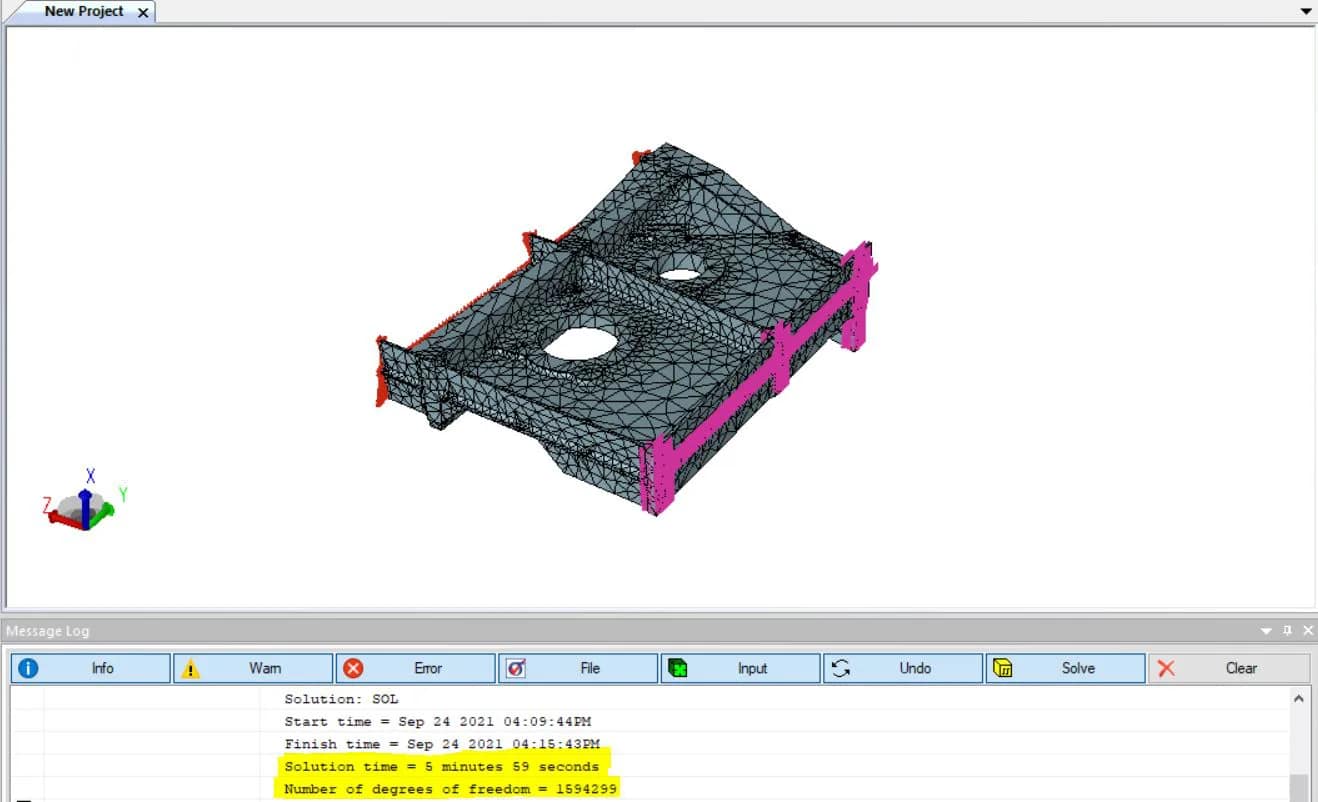
For example, the below benchmark of 22770 3D tetrahedra representing a rib section under torsion was solved at p=5 (~1.6M DOF, 6 minutes) in StressCheck v11 Update 1 and required 13.2 GB of disk space and approximately 2 GB of RAM during solution processing:
And this benchmark of 9532 3D elements (9160 tetrahedra, 212 pentahedra and 160 hexahedra) of a longeron section under bearing/bypass loading was solved at p=6 (~1.1M DOF, 7 minutes) in StressCheck v11 Update 1 and required 17 GB of disk space and approximately 3.3 GB of RAM during solution processing:

Looking for Resources?

Interested in a Demo, Evaluation or Purchase?

Have a Software Question, Issue or Feature Request?

Recent News & Events

  • Trustworthiness in Simulation: Credibility or Decision-grade Reliability?
  • Beyond the Black Box: Explainable AI Requires Explainable Simulation
  • Turtle Shells and Legacy Finite Element Codes: Evolutionary Constraints in the Age of Explainable AI

Quick Links

  • Quick Start Guide
  • Documentation
  • Software FAQs
  • Software Demos

Testimonials

  • “An advanced modeling and analysis tool for complex composite structures is generating benefits across the aerospace industrial base. StressCheck [Composites] is widely viewed as the next-generation composite joint strength tool.”


    Air Force Research Laboratory (AFRL)

Testimonials

“Small errors in modeling can lead to substantial errors in joint performance prediction. To alleviate this problem, the CAI used the handbook functionality of ESRD Inc.’s (St. Louis, Mo.) trademarked StressCheck P-version finite element software to develop reusable models of typical joints.”

Dr. John Russell , Composites World Magazine

Member Portal

  • Member Registration
  • Member Login

Contact Us

© 2026 · Engineering Software Research & Development, Inc. | Terms & Conditions | Privacy & Cookie Policy | Software License Agreement | Software Maintenance and Technical Support Policy

We use cookies on our website to give you the most relevant experience by remembering your preferences and repeat visits, as outlined in our Cookie Policy. You may adjust your cookie preferences within .

ESRD
Powered by  GDPR Cookie Compliance
Privacy Overview

This website uses cookies to improve your experience while you navigate through the website. Out of these, the cookies that are categorized as necessary are stored on your browser as they are essential for the working of basic functionalities of the website. We also use third-party cookies that help us analyze and understand how you use this website. These cookies will be stored in your browser only with your consent. You also have the option to opt-out of these cookies. But opting out of some of these cookies may affect your browsing experience.

Strictly Necessary Cookies

Strictly Necessary Cookies should be enabled at all times so that we can save your preferences for cookie settings.