• About
    • Who We Are
    • Partners & Providers
    • News & Events
    • The ESRD Blog
    • Careers
    • Contact Us
  • Applications
    • What We Solve
    • Detailed Stress
    • Composites
    • Fracture Mechanics
    • Residual Stress
    • Sim Apps
  • Products
    • What We Develop
    • StressCheck Professional
      • StressCheck Core
      • Solvers
      • Advanced Modules
      • Utilities
      • Academic Licensing
    • StressCheck Apps
      • CAE Handbook
      • StressCheck Tool Box
    • Product Updates
  • Support
    • How We Can Help
    • Training
    • Webinars
    • Quick Start Guide
    • Help Documentation
    • Software FAQ’s
  • Simulation
    • How We Simulate
    • Benchmarks
    • Simulation Governance
    • History of FEA
    • Dictionary & Terms
  • Resources
    • Browse Our Resource Library
    • White Papers
    • Case Studies
    • Product Demos
    • StressCheck Tutorials
Serving the Numerical Simulation community since 1989
  • Contact Us
  • Register
Login
Forgot Password?
Join Us
ESRDESRD
ESRDESRD
  • About
    • Who We Are
    • Partners & Providers
    • News & Events
    • The ESRD Blog
    • Careers
    • Contact Us
  • Applications
    • What We Solve
    • Detailed Stress
    • Composites
    • Fracture Mechanics
    • Residual Stress
    • Sim Apps
  • Products
    • What We Develop
    • StressCheck Professional
      • StressCheck Core
      • Solvers
      • Advanced Modules
      • Utilities
      • Academic Licensing
    • StressCheck Apps
      • CAE Handbook
      • StressCheck Tool Box
    • Product Updates
  • Support
    • How We Can Help
    • Training
    • Webinars
    • Quick Start Guide
    • Help Documentation
    • Software FAQ’s
  • Simulation
    • How We Simulate
    • Benchmarks
    • Simulation Governance
    • History of FEA
    • Dictionary & Terms
  • Resources
    • Browse Our Resource Library
    • White Papers
    • Case Studies
    • Product Demos
    • StressCheck Tutorials

Product Updates

Home Product Updates (Page 2)

StressCheck v10.2 Update 1 Released

Jun 29, 2016

ESRD is pleased to announce the release of StressCheck v10.2 Update 1, which improves on the high standard for numerical...

Webinar: What’s New and Improved in StressCheck Professional

Webinar: What’s New and Improved in StressCheck Professional

Jan 10, 2023

February 7, 2023 @ 1:00 pm EST

Join us for a 2-hour webinar on the latest in StressCheck Professional, as well as what’s currently under development in our next software update. After the webinar, attendees will be encouraged to stay for an open discussion on future development activities.
This webinar is now available to watch on-demand.

WATCH NOW
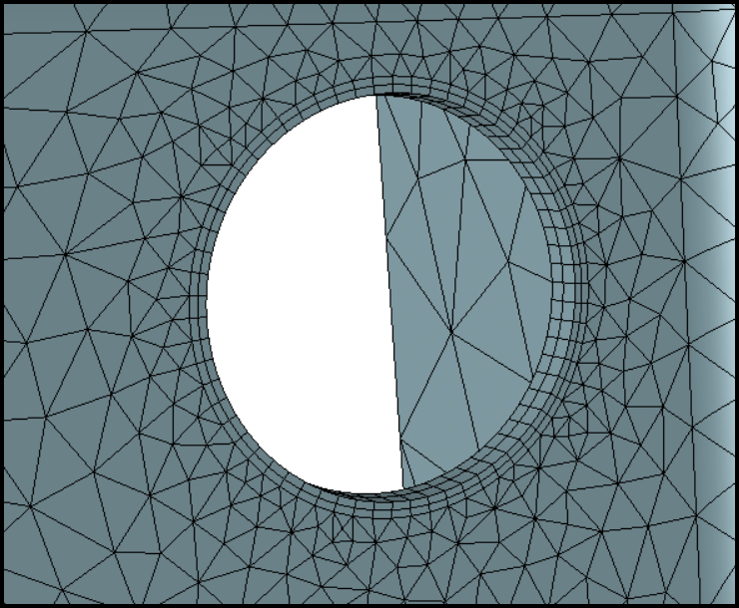
Mixed (hexa/penta/tetra) mesh boundary layer available with the release of StressCheck v11.1

WEBINAR SUMMARY

We are pleased to announce a 2-hour webinar on February 7, 2023 @ 1:00 pm EST titled “What’s New and Improved in StressCheck Professional“. Demos and briefings will be provided on the following new features and enhancements, as well as features under development for our next release.

StressCheck v11.1 Release

New features and enhancements already available with the latest StressCheck release (v11.1) include but are not limited to:

  • Support for mixed (tetra/penta/hexa) meshes
  • Support for parametric scaling of global-local loads
  • Upgraded infrastructure for faster model rendering and updating
  • Improvements to load record management and load attribute rendering
  • Improved strategies for 3D crack automeshing
  • Improved strategies for 3D stress intensity factor (SIF) computation
  • Enhancements to support the automeshing of thin parts and domains
  • New CHM-based offline documentation
  • New COM API documentation

Latest StressCheck Development Activities

Expected features and enhancements for our next StressCheck release (expected in Summer 2023) will include:

  • Mesh seeding to guide the Automesh by automatically using pre-existing node locations.
  • Upgraded toolbar icons for a clear and improved user experience.
  • New option to select the toolbar icons between 16×16 (default), 20×20 and 24×24 pixels size.
  • Movable Min/Max labels for Results plotting and extractions.
  • A Dependencies button on the Parameter pane which lists all dependencies on the selected parameter.
  • Column sorting and filtering for Parameters pane table including “Go To” to search for parameters.
  • Predictive text on input fields has been implemented for parameter and formula names.
  • Enhanced Index controls for filtering and sorting Geometry and Mesh object lists. including “Go To ID…” to access a specific ID.
  • Improved visualization of Selected status on dropdown lists containing assignment/set records.
  • Overhauled the Display Objects pane to support selective number ranges and additional object types.
  • Re-designed color definitions pane.
  • A list of object IDs belonging to a set “Contents:” and a list of objects that reference the set “Used By:” are now displayed when selecting a record on the Sets page.
  • Improved consistency of DeLast/Undo functionality
  • And much more under development!


We will also host a Q&A session at the end of the webinar to allow attendees to interact with and provide feedback to members of our product development team.
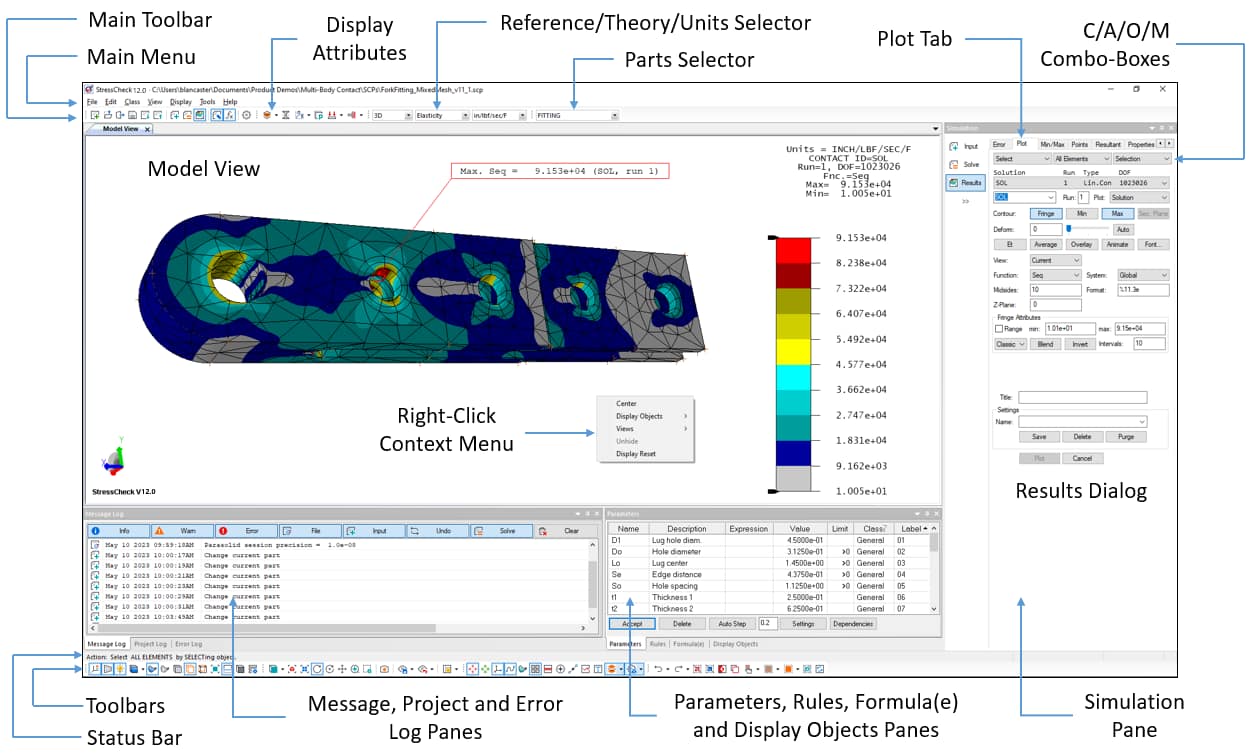
WEBINAR HIGHLIGHTS

Significant GUI improvements are on the way in the next StressCheck release.

  • Overview of recent features and enhancements already implemented in StressCheck Professional
  • Demonstration of key features and enhancements available in StressCheck v11.1
  • Overview of current development activities and future plans for StressCheck Professional
  • Demonstration of key features and enhancements expected with the next release of StressCheck
  • Open discussion and Q&A

What’s New and Improved in StressCheck Professional

What’s New and Improved in StressCheck Professional

Jan 3, 2023

February 7, 2023 @ 12:00 pm EST What’s New and Improved in StressCheck Professional Join us for a 2-hour webinar...

Happy Holidays from ESRD (2021 Edition)

Happy Holidays from ESRD (2021 Edition)

Dec 22, 2021

While 2021 continued to present unique challenges and unprecedented disturbances, we hope that you found our customer support, on-demand webinars, web-based training services and overall experience with our team to be refreshingly positive.

Happy Holidays from all of us at ESRD, and we hope you’ll check out our year-end summary!

Coming Soon in StressCheck Professional v10.5

Coming Soon in StressCheck Professional v10.5

Apr 3, 2019

Good news, everyone! We are working hard to finalize StressCheck Professional v10.5, and we’d like to share some of the latest features and enhancements users can expect to see in the next release (anticipated for Spring 2019)

New Releases Coming Soon!

Mar 30, 2017

ESRD will be releasing updates to StressCheck Professional, CAE Handbook and StressCheck Tool Box very soon. Check our Product Updates...


  • 1
  • 2

Looking for Resources?

Interested in a Demo, Evaluation or Purchase?

Have a Software Question, Issue or Feature Request?

Recent News & Events

  • Achieving Decision-Grade Reliability in Stress-Based Strength Assessment of Laminated Composites
  • Why is the hp-version of the Finite Element Method Ideally Suited for Laminated Composites?
  • XAI Requirements Paper Published in Computational Mechanics

Quick Links

  • Quick Start Guide
  • Documentation
  • Software FAQs
  • Software Demos

Testimonials

  • “Small errors in modeling can lead to substantial errors in joint performance prediction. To alleviate this problem, the CAI used the handbook functionality of ESRD Inc.’s (St. Louis, Mo.) trademarked StressCheck P-version finite element software to develop reusable models of typical joints.”

    Dr. John Russell
    Composites World Magazine

Testimonials

The software provides a highly reliable and user-friendly production stress analysis tool that will replace the Finite Element Method (FEM) tools and failure criteria the experts currently employ for analyzing bonded joints. The software includes an FEM-based handbook format, which allows non-experts to utilize models prepared by specialists. The handbook problems include built-in failure criteria, geometric and material nonlinearities, and the modern FEM technology provides better error control and the treatment of very large aspect ratios.”

Dr. Stephen P. Engelstad, Technical Fellow, Lockheed Martin Aeronautics Company, Structural Methods and Analysis

Member Portal

  • Member Registration
  • Member Login

Contact Us

© 2026 · Engineering Software Research & Development, Inc. | Terms & Conditions | Privacy & Cookie Policy | Software License Agreement | Software Maintenance and Technical Support Policy

GDPR Cookie Banner

We use cookies on our website to give you the most relevant experience by remembering your preferences and repeat visits, as outlined in our Cookie Policy. You may adjust your cookie preferences within .